Free Receipt Template: Create, Preview & Download in Minutes

TL; DR: If you’re struggling to create receipts during refund spikes, reimbursements, or audit reviews, the Bold Reports® free receipt template helps you generate clean, accurate, and branded receipts instantly. Enter payment details, preview in real time, and export a professional PDF—no signup, no watermarks, and no stored data.
Introduction
Creating receipts should be simple, but for many teams, it becomes a last-minute, error-prone task. Manually formatting documents, recalculating totals, fixing alignment issues, and responding to last-minute requests can quickly slow things down, especially during refunds, reimbursements, month-end reporting, or audit preparation.
Consider a scenario where a customer asks for confirmation during a refund, or an analyst needs payment documentation during reconciliation, and suddenly you’re rebuilding it from scratch.
To solve this problem, Bold Reports introduced the free receipt template, a simple online tool designed to help teams generate professional payment documentation in minutes. In this guide, you’ll learn who this tool is for, why receipt creation becomes a bottleneck, and how to generate a clean, professional record in a few steps.
Who is this guide for?
This guide is for teams and individuals who need to generate professional payment documentation quickly, without managing another system or tool.
It’s especially useful for:
Product, SaaS, support, sales, and customer success teams that share payment confirmation for subscriptions, renewals, upgrades, and refunds during customer interactions.
Retail teams and service providers that issue or reissue receipts after purchases, services, returns, or cancellations while keeping formats consistent across staff and locations.
Finance, operations, and analysts who need standardized payment records for reconciliation, audits, and internal reporting.
Freelancers and small business owners who want quick, professional receipts for client payments without using accounting software.
Landlords who document rent payments for transparent, reliable record-keeping.
If receipt creation in your business is frequent, urgent, or handled by multiple people, this guide will help you standardize the process and respond faster. Now that we know who benefits from this tool, let’s look at what the free receipt template actually is.
What is the free receipt template in Bold Reports?
The Bold Reports free receipt template is an online receipt generator that helps teams create professional, itemized payment records without spreadsheets, manual calculations, or design tools. It’s perfect for common use cases such as refunds, reimbursements, service payments, and audit documentation, while keeping every record consistent, branded, and easy to share.
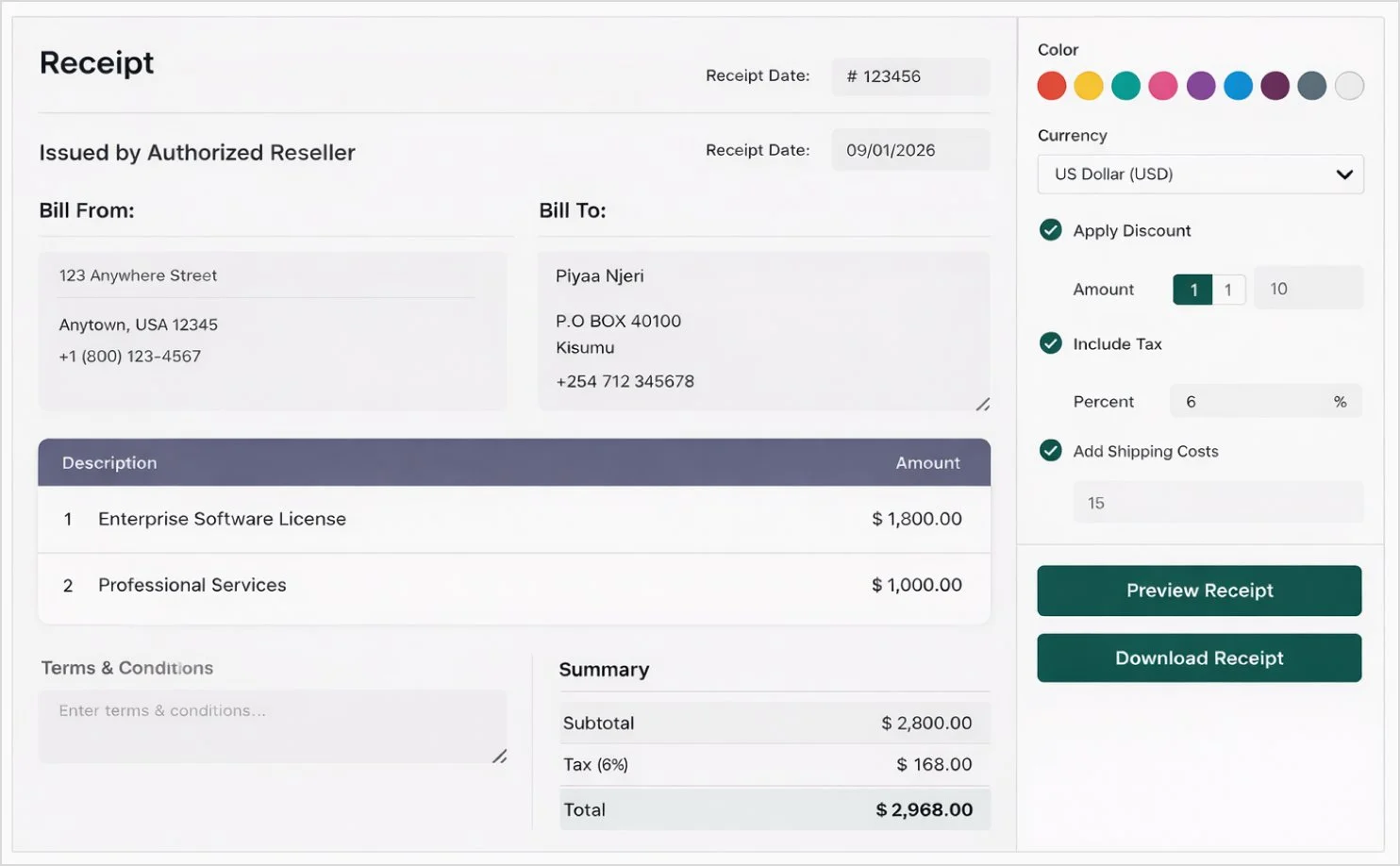
But why do so many teams turn to free receipt generators in the first place? Let’s break it down.
Why teams use free receipt generators
Teams use free receipt generators when they need a quick way to document payments without introducing extra tools or process overhead. Common reasons include:

No accounting software needed: Create documentation for simple transactions without setting up invoicing or bookkeeping tools.
Handles one-off and edge cases: Create receipts for refunds, reimbursements, deposits, or miscellaneous payments that don’t follow a standard invoicing procedure.
Fast turnaround for urgent requests: Produce a receipt immediately when someone asks, without relying on a specific person or internal approval chain.
Easy to share and store: Export a ready-to-send PDF that can be emailed, printed, or saved as documentation for future reference.
However, when receipts are created manually, these needs often turn into bottlenecks. Let’s explore them in detail.
What is the real problem with manual receipt creation?
The issue isn’t that teams don’t know how to create receipts. The real problem is that receipt creation lacks a fast, standardized system, so every request turns into manual work.
Outside any system: Receipts are built in documents, spreadsheets, or emails instead of a consistent template, which causes formatting inconsistencies and extra rework.
Only when urgently needed: Receipts are created reactively during refunds, reimbursements, or last-minute customer requests, which slows response time and increases the chance of errors.
Owned by different people: Different teams and individuals use different formats and details, which results in uneven quality and weak brand presentation.
Manual calculations: Totals, taxes, and discounts are computed by hand, which increases the risk of incorrect amounts and follow-up corrections.
That’s why teams need a faster, consistent way to generate receipts, without manual edits. The Bold Reports’ receipt maker standardizes receipt creation, so professional, ready-to-share receipts are available whenever they’re needed. Let’s see how it solves these challenges.
How the Bold Reports free receipt template solves issues
The Bold Reports free receipt template solves these bottlenecks by acting as a ready-to-fill receipt maker that standardizes formatting, automates calculations, and lets you export a clean PDF instantly, without signup or data storage. It benefits you in the following ways:
Automated workflow: Use a ready-to-fill template instead of rebuilding receipts in Word or Excel every time, so you can respond faster during refunds, reimbursements, and customer requests.
Accurate payment details: Automatically calculate totals, taxes, and discounts as you fill in values, so the final receipt reflects the exact amount paid without manual recalculation.
Clear payment proof: Present payment information in a clear, professional format that shows what was paid, when it was paid, and by whom, so you can share confirmation confidently, avoid disputes, and decide faster.
Easy returns and records: Keep receipts consistent and easy to reference, so handling returns, confirming services, and following up on requests becomes straightforward—no searching through emails or files.
Private and secure: Process details in real time and clear them after use, so you can generate receipts without worrying about data being stored or tracked.
With the benefits clear, let’s break down the features that make this online receipt generator both powerful and easy to use.
Key features of the Bold Reports free receipt template
The Bold Reports free receipt template is an online receipt generator designed to simplify receipt creation while maintaining a clean, professional look. Here’s what makes it stand out:
Online receipt generator: Enter your payment details and download the receipt right away—no account setup or additional tools required.
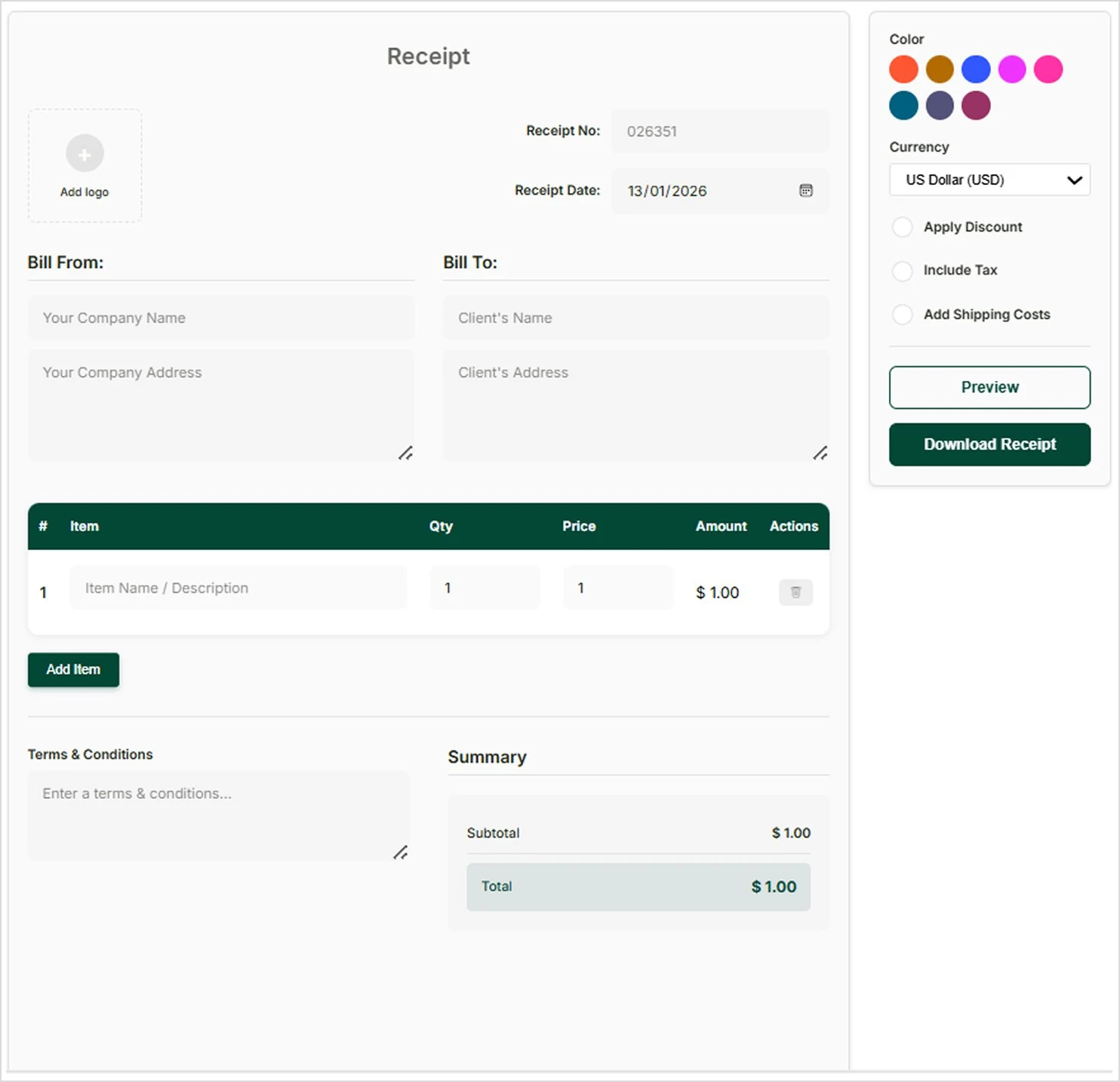
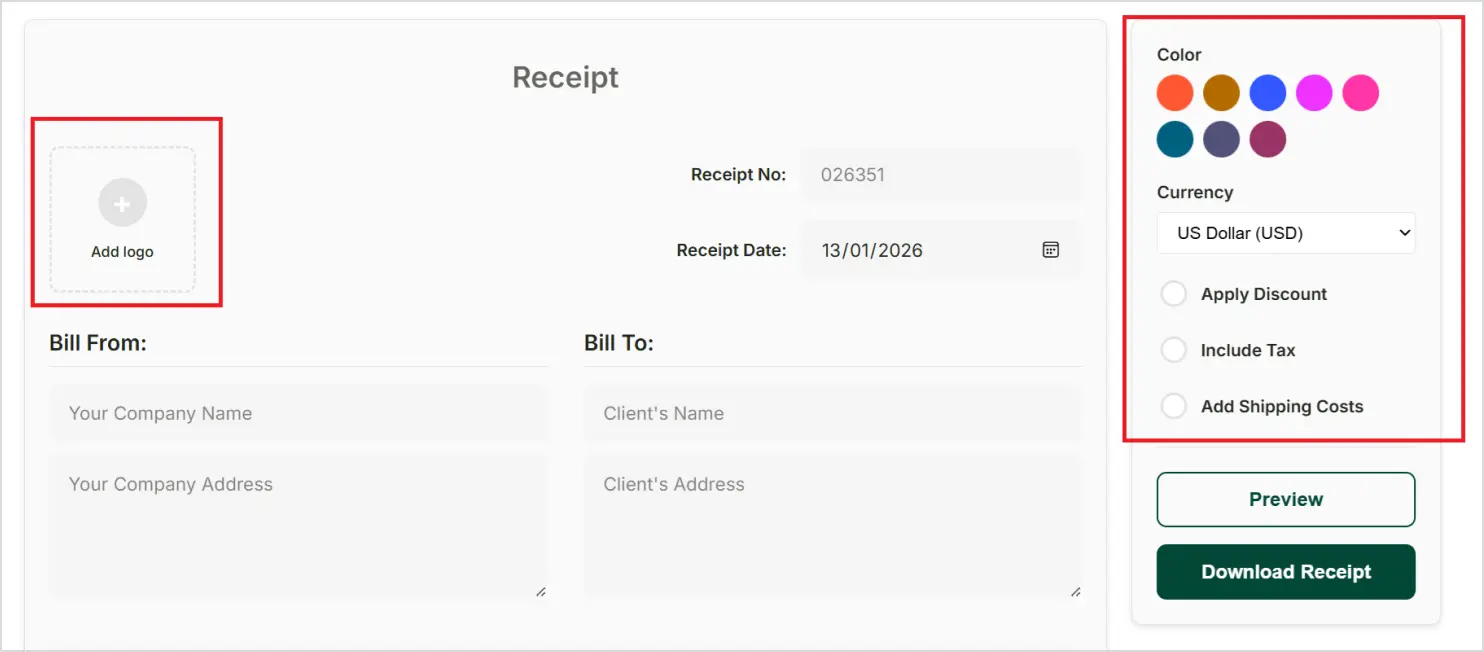
Receipt customization: Customize your receipt by adding your logo, selecting brand colors, changing currency, and applying discounts, tax, or shipping charges.
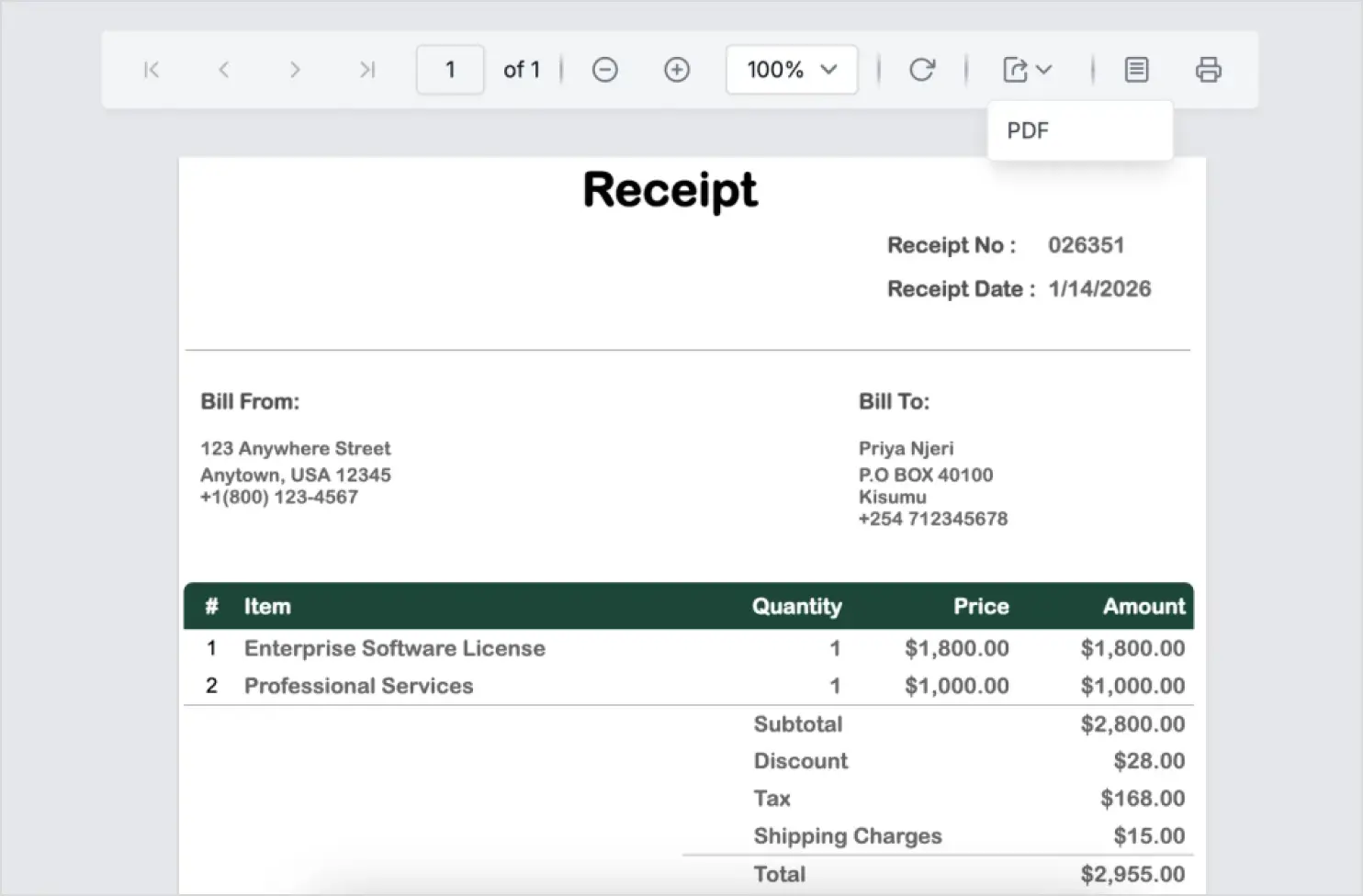
Clean PDF export: Export a watermark-free PDF that’s ready to print, email, or store as a payment record.
Now, let’s cover how to generate a receipt, step by step.
How to generate professional receipts using the Bold Reports free receipt template
Open the receipt template on the Bold Reports website.
Fill in the required fields, like business details, customer information, and payment details, to create a receipt.
Customize your receipt by:
Uploading your company logo to give it a professional look.
Adding the receipt number to act as a unique identifier for the transaction, making it easy for you to track, reference, and verify payments in the records.
Adding the receipt date to show when it was received. This makes it easier for you to confirm when the transaction occurred.
Add various details for the Bill From field (company or personal name, address, and contact information) and Bill To field (customer/recipient’s information) to identify the parties in the transaction.
In the table section, add the item that the client purchased in the Item Also, add the quantity and price for each item. The total price will automatically be calculated in the Amount column based on the provided quantity and price values. Use the Add Item button below the list to add more items to the receipt.
Apply basic formatting:
Change the table background color and currency.
Add terms and conditions.
Apply discounts, tax, and shipping costs as needed.
Click Preview to preview the receipt. From here, you can print the receipt by clicking the Print option in the preview toolbar or export it to several different formats by using the Export option.

To try it yourself, open the free receipt template on the Bold Reports website. For a complete walkthrough, check out our YouTube video.
Key takeaways
Creating receipts shouldn’t mean copying details into documents, fixing formatting, or double-checking totals. With the Bold Reports® free receipt template, you can generate clean, accurate, and branded receipts in minutes, with no extra setup and privacy-first handling.
Whether you’re issuing receipts for customers, reimbursements, services, or refunds, this tool helps you stay organized and move faster.
Ready to generate your next receipt? Try the free receipt template now. If you’d like to explore more Bold Reports reporting tools, start a free 30-day trial or book a personalized demo with our team.
You can also explore the following resources to learn about other free tools offered by Bold Reports:
Frequently asked questions
What is a free receipt template?
A free receipt template is generally an online tool that lets you create professional, itemized receipts by entering payment details and then exporting a PDF, without manual formatting or design work.
Is the Bold Reports receipt template free to use?
Yes. Our receipt template is completely free with no signup or subscription required.
Can I download the receipt as a PDF?
Yes. You can preview, print, or download your receipt as a PDF.
Will the receipt have a watermark?
No. All receipts are clean, watermark-free, and ready for professional use.
Is there a daily limit? Yes.
You can create up to 20 receipts per day.
Can I customize the receipt?
Yes. You can add your logo, choose a color, and apply taxes or discounts.
Is my data saved?
No. Your data is processed in real time—we never store or share it.


